
Millioner on your phone
Home-screen shortcut for Android and iOS
Millioner Casino App: A Browser Icon in Place of a Download
Updated:
People search for a Millioner casino app; the operator's own pages offer nothing of the sort. I went through the Create Shortcut page, the footer and the source code of the home page to establish what a phone user actually gets, and I wrote the steps down in my own words.
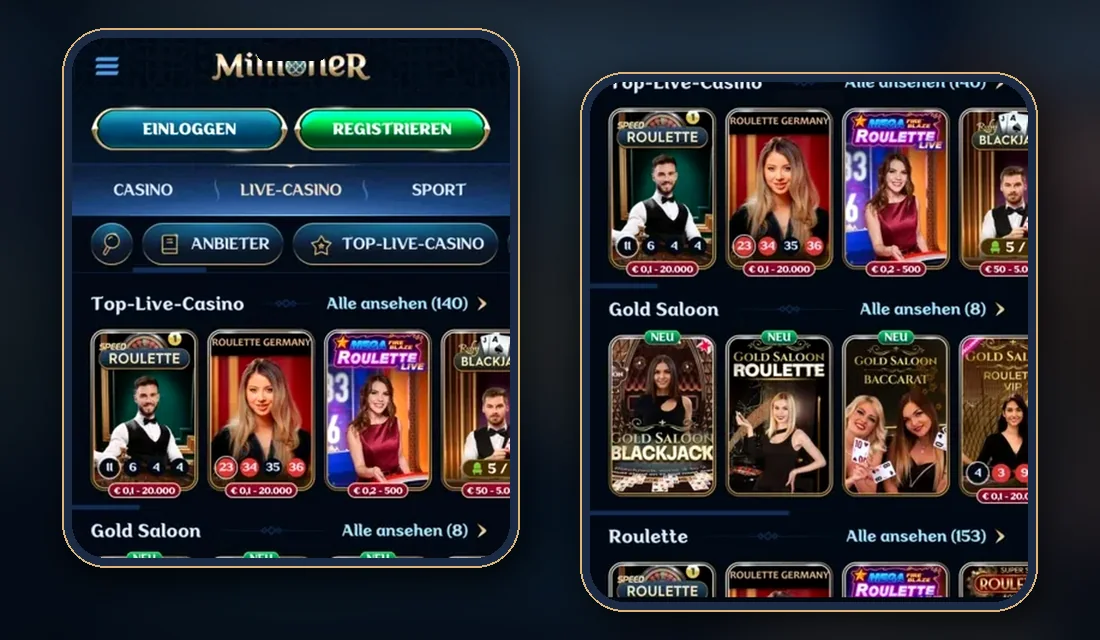
No Download Exists: What Millioner Says About an App
The home page admits it outright: "we don't have a dedicated app". The slots page makes the same point from the opposite side, telling visitors that everything opens in the web browser of an iOS or Android device and that storage space is spared as a result. Nowhere did I find an APK, an App Store entry or a Google Play entry referenced. A file or store listing carrying the Millioner name therefore comes from somebody else, and I would not install it.
What the operator offers instead is an icon. The footer has a column headed General Info, and one of its links is called Create Shortcut. That page holds two short lists, one per platform, and nothing more: supported browsers and a minimum system version go unmentioned.
Android: The Route in Four Moves
Here is how I would retell the Android list.
- The page begins with its own install link, so tapping that link is the quickest attempt.
- Should nothing happen, call up the browser menu, which hides behind three dots at the top right corner.
- Travel down the list until the entry "Add to Home screen" shows up, then choose it.
- Type a label for the icon; the browser places it among your other icons.
Only the first move depends on the site. The remaining three are ordinary browser functions that behave identically for any web address.
iPhone and iPad: Three Moves
The iOS list is shorter because it skips the install link.
- Press the symbol that looks like a box with an arrow leaving it; a menu unfolds.
- Further down that menu sits "Add to Home Screen"; select it.
- Name the icon and confirm, after which it lands beside your apps.
The page names no browser, so which iOS browsers offer the menu entry stays an open question.
What the Icon Changes and What It Leaves Alone
A shortcut of this kind is a bookmark with a picture. To keep expectations realistic I put the open questions in one table.
| Question | What the pages show |
|---|---|
| Is anything installed? | No file is offered; the icon opens the website |
| Does Millioner call it a PWA? | No. The term never appears, although the home page source links a web manifest and an Apple touch icon |
| Push notifications | Not mentioned anywhere |
| Supported browsers and system requirements | Not stated |
| A separate mobile cashier or mobile-only offer | None is described |
Since nothing is installed, nothing needs updating by hand, and the experience stands or falls with the connection. Deleting the icon removes only the icon; the account is untouched by it.
The Lobby on a Small Screen
Finding a game on a phone leans on the header search, which looks through games, categories and providers at once, and on the provider filter with its Popular, A-Z and Amount sorting. Plenty of titles carry a Demo button beside Play, useful for seeing how a game fits a narrow display before any money is involved.
Size matters for scrolling, so here are figures the lobby counters displayed as of November 2025: 12,327 games overall, with 185 filed under Megaways and 168 under Instant Games. Counters shift with date and country version. Live tables print a stake range on each card before you join, a detail I go into on the live dealer page, while odds, bet slips and Cash Out belong to my sports betting notes. A video stream to a live table weighs more than a slot, so I would keep those sessions on Wi-Fi.
Account, Money and Limits From a Phone
No rule bends for mobile. Signing in uses the username and password pair discussed in the login walkthrough. The euro cashier with its deposit ranges and payout caps is laid out in the full Millioner review. Offers, wagering deadlines and game weightings have their own bonus breakdown.
For readers in Ireland one line of the terms outweighs any icon. Clause 2.3 sets out the Excluded Jurisdictions, and this country is not on that list, but the site names no operator and no licence, so the reader must check local rules before registering. Licence details are missing from the footer, which carries just an 18+ badge and payment logos, and the operating company stays anonymous; anyone told the brand is authorised here can test that claim against the Gambling Regulatory Authority of Ireland's public list of licensed operators, if one exists.
A phone invites play in spare minutes, which is exactly why I fix a budget beforehand. Two measures appear on Millioner's responsible gaming page, self-exclusion and a temporary break, and each is arranged through support, not through a switch in the profile. Limit settings inside the account are described nowhere, so I would ask what exists. Anyone in Ireland uneasy about their own play can turn to the GRAI's Get Help section at grai.ie, or to Gamblers Anonymous Ireland at gamblersanonymous.ie. Adults only, 18 and over.
Frequently asked questions
Can I get a Millioner casino app from Google Play or the App Store?
No. Neither store appears anywhere on millioner.com, an APK is not offered, and the home page states in plain words that a dedicated app does not exist. Create Shortcut, linked from the footer, is the single mobile aid the operator provides.
Is the Millioner shortcut a PWA?
The site never uses that term. Technically the home page links a web manifest and an Apple touch icon, which explains why the shortcut behaves like a web-app icon, but Millioner describes it only as Create Shortcut or Add to Home screen.
Does the Millioner shortcut send push notifications?
No page says so. Notifications, compatible browsers and device requirements all go undocumented, which makes support the place to ask if alerts matter to you.
Can I try Millioner games on a phone without paying?
Often, yes: a Demo button sits beside Play on a large share of slots, and by the site's own account most of them open as demos. A list of the titles that include it is not given.
18+. Terms apply. Gambling can be addictive — play responsibly.